 CherryIN
FAQ
Solutions to common questions
Why does it say "insufficient quota" when my account balance is enough?
This is because token quota and account balance are separate:
- Token quota is only used to set the maximum usage limit
- Users can freely set their token quota
- Please check if your token quota is sufficient
Why does my request show "too many requests"?
To ensure a good experience for all users, we currently have a limit of 495 successful requests per 30 minutes (this number may change at any time).
Please use the service responsibly. If abnormal usage is detected (such as unusually high-frequency requests, account sharing, etc.), we may restrict the account for 7 days to maintain service stability.
If you have any questions during use, please visit the About page to join our WeChat community group, and we will assist you promptly.
Why can't I use models marked as "free" before recharging, or why does CherryStudio show connection test errors?
Our services are provided through legitimate channels. While ensuring quality, we offer a series of models for users to quickly experience. Therefore, free models are only available to paid users. Users cannot access them before making a payment.
Can I get an invoice for API recharges in mainland China?
Unfortunately, this is not available at the moment. Our payment channels currently do not support this feature.
Where do I create an API Key, and which Base URL should I use?
Create an API Key on the Token Management page in the CherryIN console. For most OpenAI-compatible clients, use:
https://open.cherryin.net/v1When using the built-in CherryIN provider in CherryStudio, you usually only need to enter the API Key. If a tool-specific guide provides different settings, follow that guide. See the OpenAI-Compatible Integration Guide for details.
Why do I get 401 Unauthorized?
A 401 response usually means authentication failed. Check the following:
- The API Key was copied completely
- There are no spaces or line breaks before or after the Key
- The request sends the Key as
Authorization: Bearer <API_KEY> - The client is not using a Key from another platform
Never share a complete API Key in chats, screenshots, or public code repositories.
Why do I get 404 or a model-not-found error?
First verify the Base URL and model name:
- Most OpenAI-compatible clients use
https://open.cherryin.net/v1 - Use the complete model name in
provider/model-nameformat, such asanthropic/claude-sonnet-4.5 - Sign in to the CherryIN console and confirm the currently available model ID on the Model List page
Some clients append /v1 automatically, so make sure the final request URL does not contain a duplicated path.
Can I use CherryIN with the OpenAI SDK or OpenAI-compatible tools?
Yes. Replace the SDK or tool's API Key with your CherryIN Key and set the Base URL to https://open.cherryin.net/v1. Model availability and parameters may differ, so use the complete model ID shown in the console. See the API Code Tutorial for examples.
How should I store my API Key securely?
- Use environment variables or a
.envfile included in.gitignorefor local development - Use cloud secrets or a dedicated secret manager in production
- Never put the Key in frontend code, public repositories, logs, or screenshots
- If you suspect a Key has leaked, disable it immediately and create a new one
How to fix the issue where CherryStudio conversations with Gemini Banana Pro model have a high probability of not generating images?
Here are some suggestions:
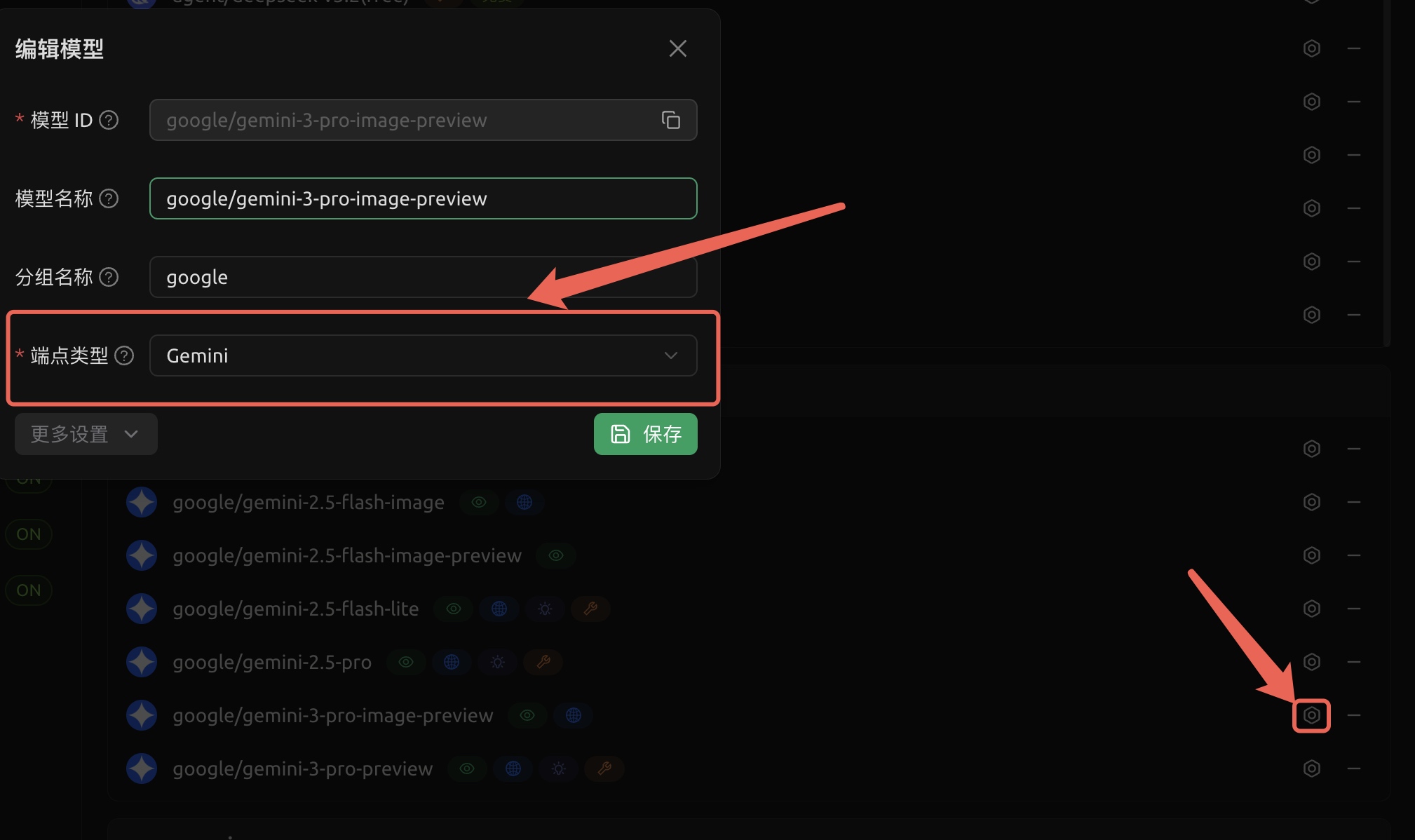
- In the CherryIN provider model endpoint, change
google/gemini-3-pro-image-previewto the Gemini endpoint
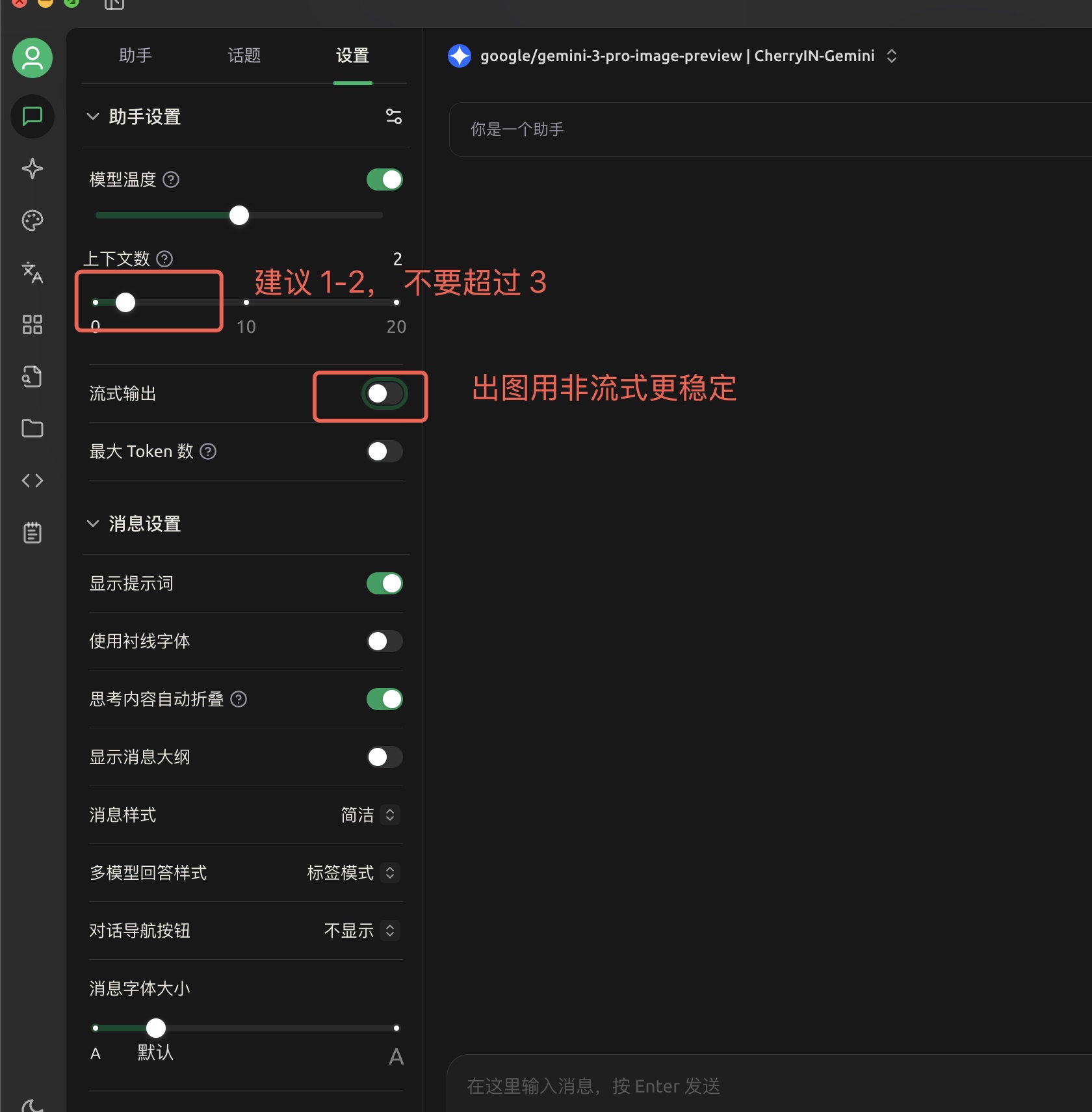
- Conversation page settings: For image generation scenarios, disable streaming, and limit conversation context to 1-2