 CherryIN
Claude Code Setup Guide
Complete guide to using CherryIN API with Claude Code
What is Claude Code?
Claude Code is Anthropic's official command-line AI coding assistant. It helps you write code, debug issues, and execute commands directly in your terminal.
By configuring the CherryIN API, you can use our Claude model services within Claude Code.
Before You Begin
Please ensure you have:
- Completed the steps in Getting Started to obtain your API Key
- Installed Claude Code
Configuration Steps
Set Environment Variables
Choose the configuration method based on your operating system and shell:
Edit the ~/.zshrc file:
nano ~/.zshrcAdd the following content at the end of the file:
# CherryIN API Configuration
export ANTHROPIC_BASE_URL='https://open.cherryin.cc'
export ANTHROPIC_AUTH_TOKEN='sk-xxxxx'  # Replace with your API Key

# Model Configuration (optional, for setting default models)
export ANTHROPIC_DEFAULT_OPUS_MODEL='anthropic/claude-sonnet-4.5'
export ANTHROPIC_DEFAULT_SONNET_MODEL='anthropic/claude-sonnet-4.5'
export ANTHROPIC_DEFAULT_HAIKU_MODEL='anthropic/claude-haiku-4.5'
export CLAUDE_CODE_SUBAGENT_MODEL='anthropic/claude-sonnet-4.5'
After saving, run the following command to apply the configuration:
source ~/.zshrcEdit the ~/.bashrc file:
nano ~/.bashrcAdd the following content at the end of the file:
# CherryIN API Configuration
export ANTHROPIC_BASE_URL='https://open.cherryin.cc'
export ANTHROPIC_AUTH_TOKEN='sk-xxxxx'  # Replace with your API Key

# Model Configuration (optional, for setting default models)
export ANTHROPIC_DEFAULT_OPUS_MODEL='anthropic/claude-sonnet-4.5'
export ANTHROPIC_DEFAULT_SONNET_MODEL='anthropic/claude-sonnet-4.5'
export ANTHROPIC_DEFAULT_HAIKU_MODEL='anthropic/claude-haiku-4.5'
export CLAUDE_CODE_SUBAGENT_MODEL='anthropic/claude-sonnet-4.5'
After saving, run the following command to apply the configuration:
source ~/.bashrcOpen PowerShell as Administrator and run the following commands:
# CherryIN API Configuration
[Environment]::SetEnvironmentVariable("ANTHROPIC_BASE_URL", "https://open.cherryin.cc", "User")
[Environment]::SetEnvironmentVariable("ANTHROPIC_AUTH_TOKEN", "sk-xxxxx", "User")  # Replace with your API Key

# Model Configuration (optional, for setting default models)
[Environment]::SetEnvironmentVariable("ANTHROPIC_DEFAULT_OPUS_MODEL", "anthropic/claude-sonnet-4.5", "User")
[Environment]::SetEnvironmentVariable("ANTHROPIC_DEFAULT_SONNET_MODEL", "anthropic/claude-sonnet-4.5", "User")
[Environment]::SetEnvironmentVariable("ANTHROPIC_DEFAULT_HAIKU_MODEL", "anthropic/claude-haiku-4.5", "User")
[Environment]::SetEnvironmentVariable("CLAUDE_CODE_SUBAGENT_MODEL", "anthropic/claude-sonnet-4.5", "User")
After configuration, open a new PowerShell window for the changes to take effect.
Replace Your API Key
Please replace sk-xxxxx with your actual API Key obtained from the CherryIN console.
Restart Claude Code
After setting the environment variables, you need to completely exit and restart Claude Code for the new configuration to take effect.
# Start Claude Code
claude
Verify Configuration
After starting Claude Code, you can verify the configuration by:
- Using the
/modelcommand to check the current model - Sending a test message to see if it responds correctly
Model ID Format
CherryIN model names follow the format vendor/model-name, e.g., anthropic/claude-sonnet-4.5. When using the /model command, enter the complete model ID.
Switching Models
In Claude Code, you can use the /model command to switch between different models:
/model anthropic/claude-sonnet-4.5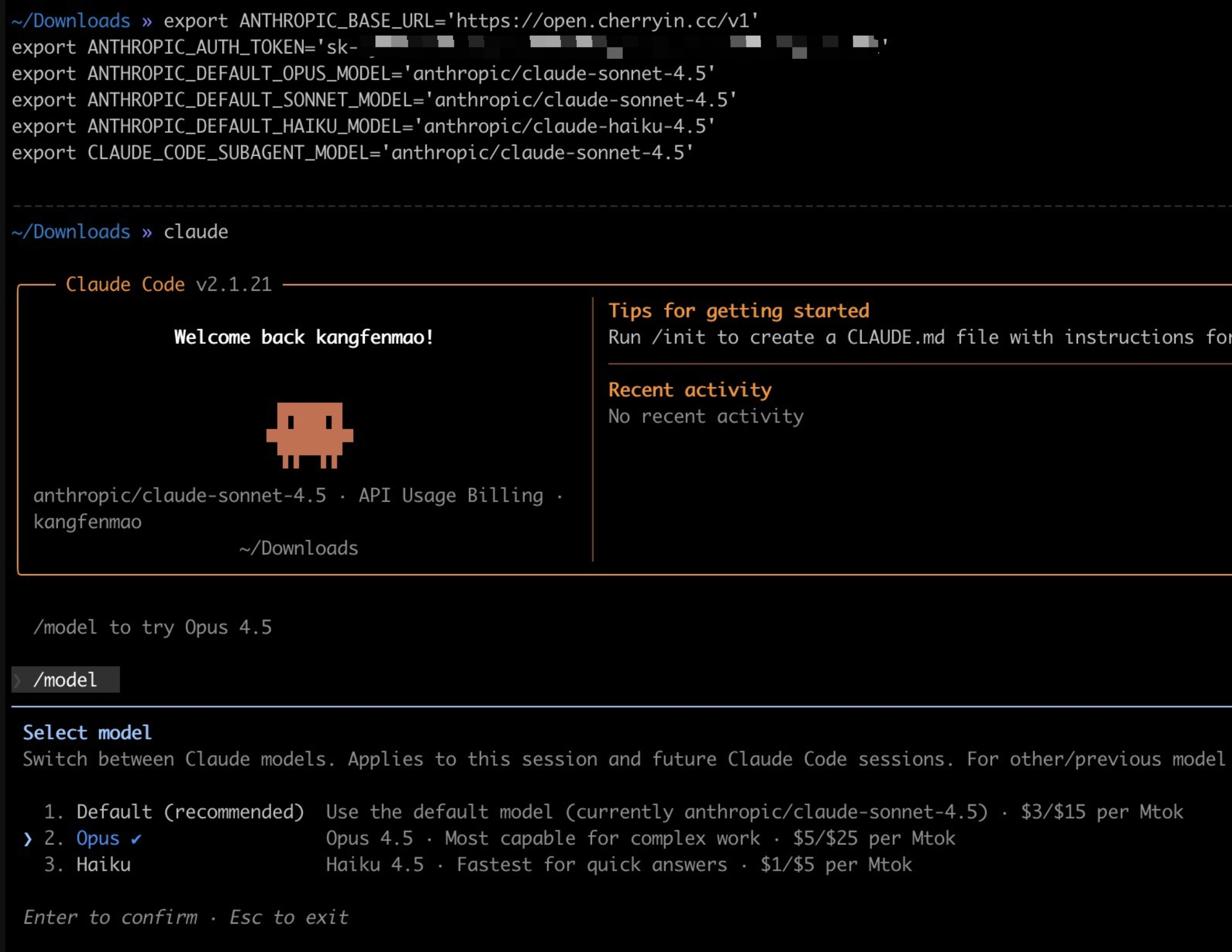
Available Models
| Model ID | Description |
|---|---|
anthropic/claude-opus-4 | Claude Opus 4, most powerful model |
anthropic/claude-sonnet-4.5 | Claude Sonnet 4.5, balanced performance and cost |
anthropic/claude-haiku-4.5 | Claude Haiku 4.5, fast responses |
View More Models
Log in to the CherryIN Console to see all available Claude models.
Environment Variables Reference
| Environment Variable | Required | Description |
|---|---|---|
ANTHROPIC_BASE_URL | Yes | CherryIN API endpoint |
ANTHROPIC_AUTH_TOKEN | Yes | Your API Key |
ANTHROPIC_DEFAULT_OPUS_MODEL | No | Default Opus model |
ANTHROPIC_DEFAULT_SONNET_MODEL | No | Default Sonnet model |
ANTHROPIC_DEFAULT_HAIKU_MODEL | No | Default Haiku model |
CLAUDE_CODE_SUBAGENT_MODEL | No | Model used by sub-agents |
FAQ
Configuration not working?
- Verify environment variables are set: Run
echo $ANTHROPIC_BASE_URLto check if it's correctly configured - Fully restart Claude Code: Make sure to close all Claude Code processes before restarting
- Check API Key: Confirm your API Key is correct and your account has sufficient balance
Error: Authentication failed
Cause: Invalid API Key or incorrect configuration
Solution:
- Check if the
ANTHROPIC_AUTH_TOKENenvironment variable is correctly set - Confirm there are no extra spaces or newlines in the API Key
- Verify the API Key is valid in the console
How to temporarily use a different API Key?
You can specify environment variables when starting Claude Code:
ANTHROPIC_AUTH_TOKEN='sk-your-other-key' claudeNext Steps
- Check the Code Tutorial for more API usage examples
- Visit the FAQ for more help