 CherryIN
VSCode Setup Guide
Use CherryIN API in VS Code Copilot Chat through Custom Endpoint (BYOK)
About VS Code BYOK
VS Code Copilot Chat supports Bring Your Own Key (BYOK) — you can plug in any OpenAI-compatible model service via Custom Endpoint.
Because CherryIN exposes an OpenAI-compatible API, you can add it through Custom Endpoint.
Prerequisites
- A version of VS Code that supports
Chat: Manage Language Models(any recent stable release; upgrade if you don't see the command) - GitHub Copilot Chat extension installed and enabled
- BYOK only applies to Chat / Agent — it does not replace the model used for code completions
- Works on Copilot Free / Pro / Pro+
Before you start
Make sure you have:
- Finished Quick Start and obtained your CherryIN API key
- Installed the latest VS Code and the GitHub Copilot Chat extension
- Picked a model ID such as
anthropic/claude-sonnet-4.5
Setup Steps
Open the Language Models panel
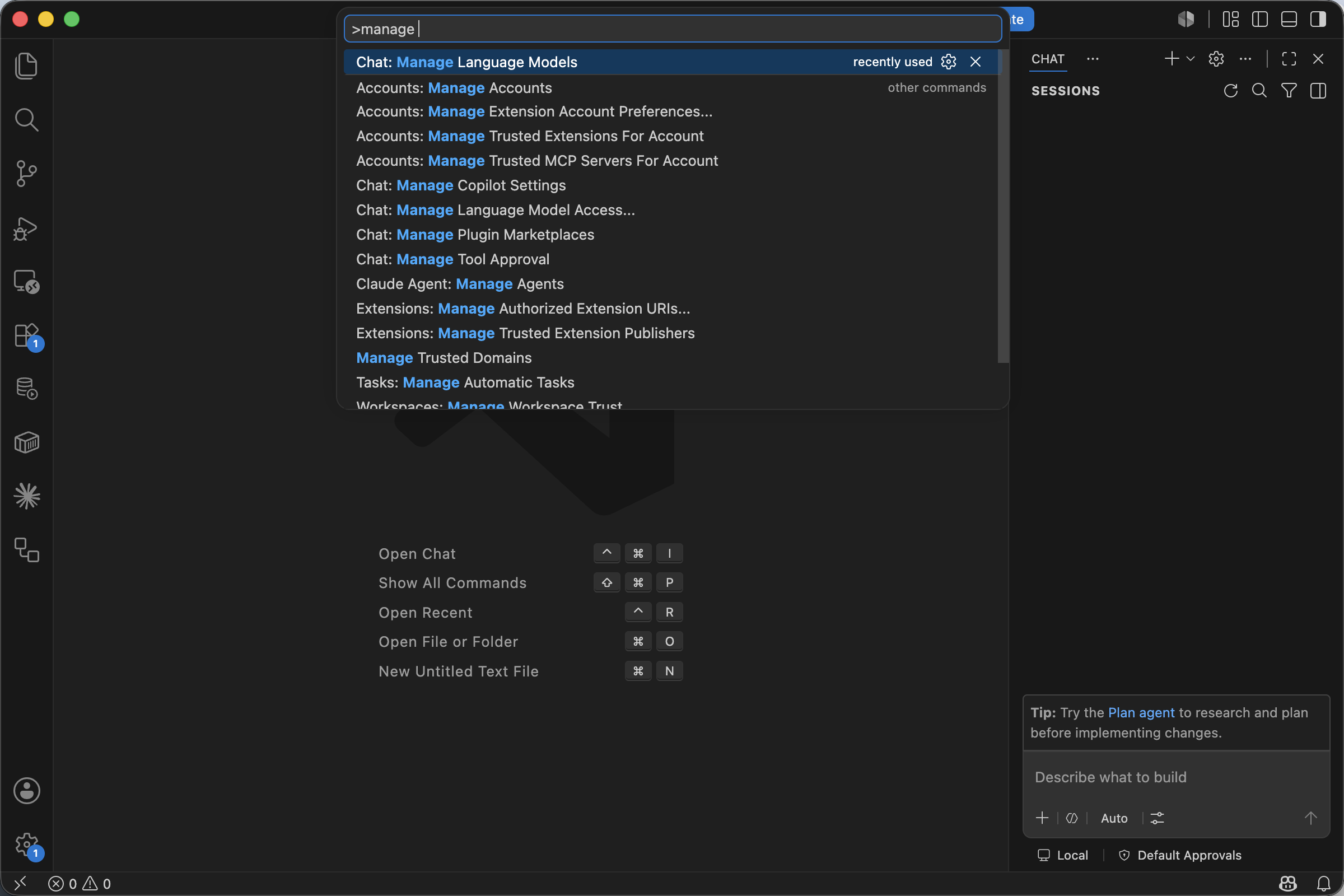
Press ⌘ + Shift + P (macOS) or Ctrl + Shift + P (Windows / Linux) to open the Command Palette, type manage, and run Chat: Manage Language Models.
You can also reach the same panel from the gear icon in the Chat view.
Add a Custom Endpoint
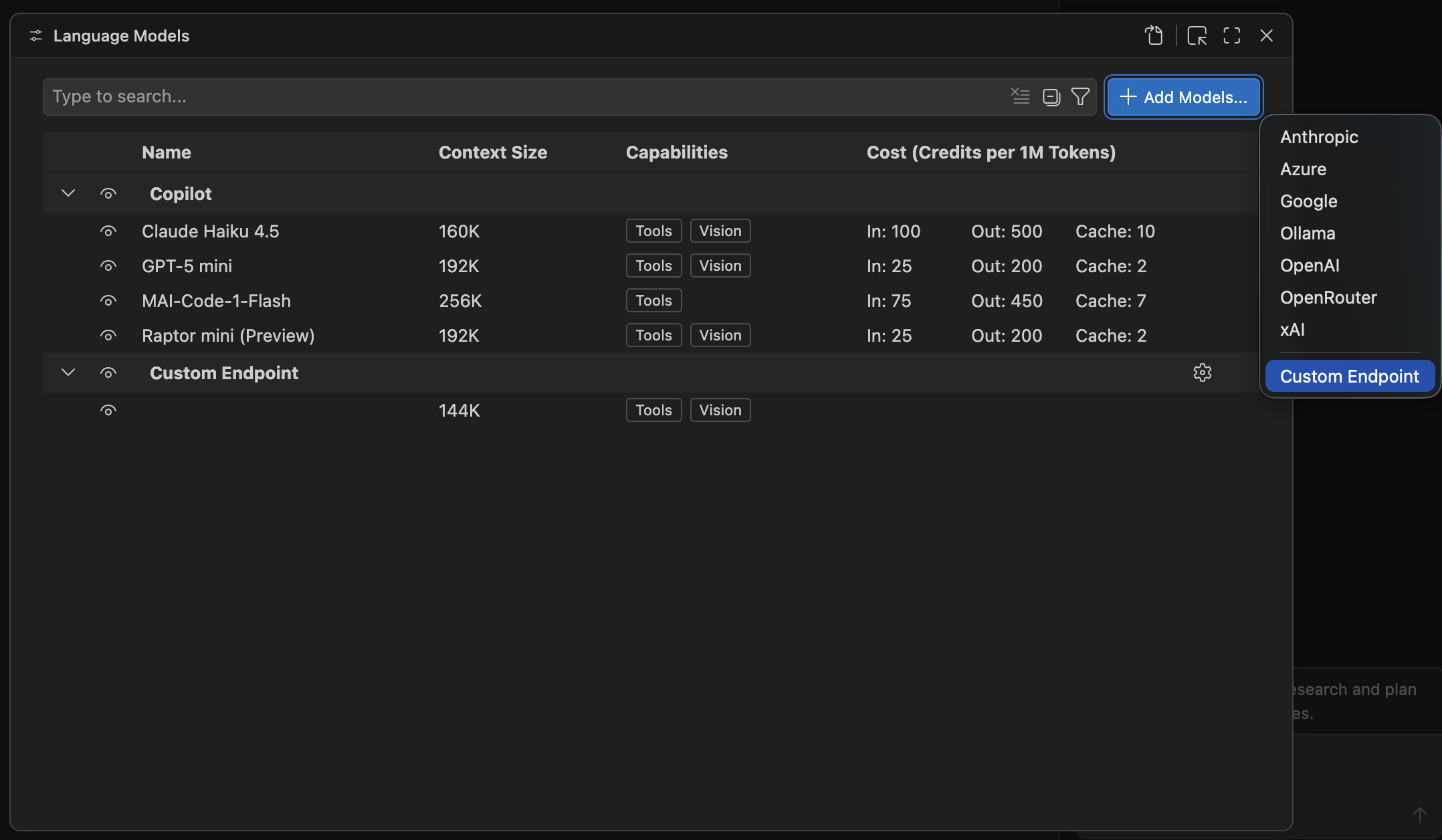
In the Language Models panel, click Add Models... in the top-right, then pick Custom Endpoint from the dropdown.
The dropdown also lists built-in providers like Anthropic / Azure / Google / Ollama / OpenAI / OpenRouter / xAI — for CherryIN, choose Custom Endpoint.
Enter your API key
VS Code then shows a Custom Endpoint: API Key prompt with the placeholder Enter value for apiKey.
Paste your CherryIN API key and press Enter.

Choose the API Type
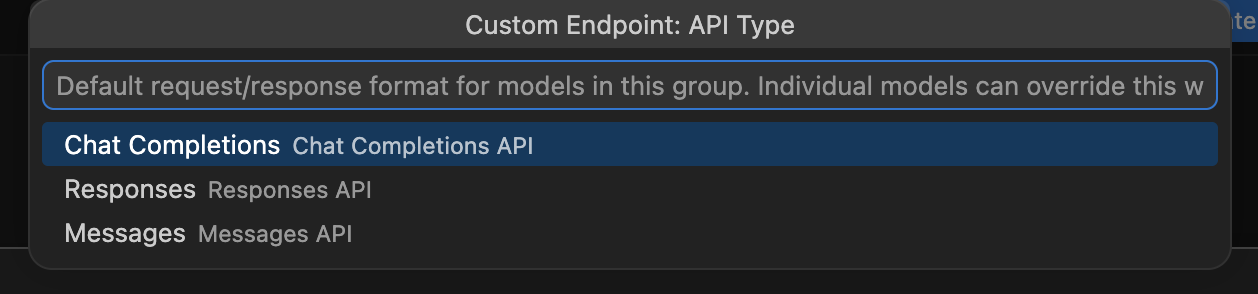
Next, VS Code shows a Custom Endpoint: API Type quick pick with three options:
| Option | Description |
|---|---|
Chat Completions | OpenAI-style Chat Completions API |
Responses | OpenAI's newer Responses API |
Messages | Anthropic-style Messages API |
Pick Chat Completions for CherryIN.
Why not Messages?
Even when you're using Claude models, choose Chat Completions here — CherryIN exposes the OpenAI-compatible endpoint (/v1/chat/completions), not the native Anthropic Messages protocol.
Fill model details in chatLanguageModels.json
After confirming the key, VS Code opens chatLanguageModels.json (in your user config directory, e.g. ~/Library/Application Support/Code/User/chatLanguageModels.json on macOS) with a skeleton entry already filled in:
[
  {
    "name": "Custom Endpoint",
    "vendor": "customendpoint",
    "apiKey": "${input:chat.lm.secret.xxxxxxxx}",
    "apiType": "chat-completions",
    "models": [
      {
        "id": "",
        "name": "",
        "url": "",
        "toolCalling": true,
        "vision": true,
        "maxInputTokens": 128000,
        "maxOutputTokens": 16000
      }
    ]
  }
]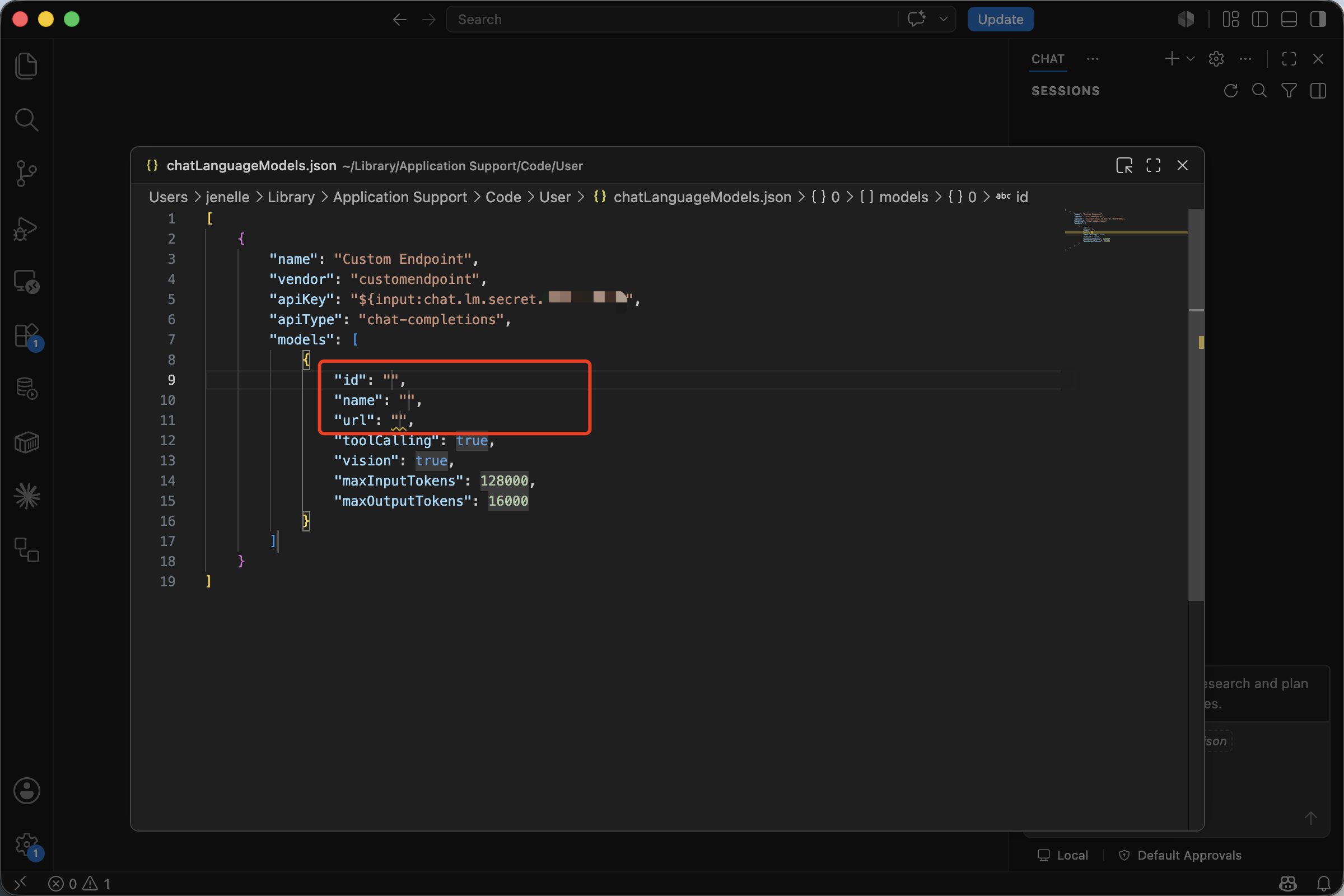
You only need to fill three empty fields: id, name, and url (highlighted in the screenshot above). Leave the rest (vendor, apiKey, apiType, default token limits) as VS Code generated them.
Filled in for CherryIN:
[
  {
    "name": "Custom Endpoint",
    "vendor": "customendpoint",
    "apiKey": "${input:chat.lm.secret.xxxxxxxx}",
    "apiType": "chat-completions",
    "models": [
      {
        "id": "anthropic/claude-sonnet-4.5",
        "name": "CherryIN · Claude Sonnet 4.5",
        "url": "https://open.cherryin.net/v1/chat/completions",
        "toolCalling": true,
        "vision": true,
        "maxInputTokens": 200000,
        "maxOutputTokens": 8192
      }
    ]
  }
]
Field guide:
| Field | What to put |
|---|---|
id | The exact CherryIN model ID, e.g. anthropic/claude-sonnet-4.5 |
name | Display name shown in the model picker — name it whatever you want |
url | The full endpoint path: https://open.cherryin.net/v1/chat/completions |
toolCalling / vision | Whether the model supports tool calls / vision — set per model |
maxInputTokens / maxOutputTokens | Use the model's real limits; VS Code defaults to 128000 / 16000 |
apiKey is a reference, not the raw key
The ${input:chat.lm.secret.xxxxxxxx} you see in the apiKey field is a reference to VS Code's Secret Storage (system keychain) — your real key has already been stored there in the previous step. Do not replace it with your raw key, or you'll leak it in plain text.
After saving the JSON, the new model appears under the Custom Endpoint group in the Language Models panel.
Switch in Chat and test
Open the Chat view, click the model picker at the bottom, switch to the CherryIN · Claude Sonnet 4.5 you just added, and send a simple message:
Read the current project structure and tell me what this repository is for.If you get a normal response, the setup is working.
Adding multiple models
models is an array — you can register several CherryIN models in the same chatLanguageModels.json:
[
  {
    "name": "Custom Endpoint",
    "vendor": "customendpoint",
    "apiKey": "${input:chat.lm.secret.xxxxxxxx}",
    "apiType": "chat-completions",
    "models": [
      {
        "id": "anthropic/claude-sonnet-4.5",
        "name": "CherryIN · Claude Sonnet 4.5",
        "url": "https://open.cherryin.net/v1/chat/completions",
        "toolCalling": true,
        "vision": true,
        "maxInputTokens": 200000,
        "maxOutputTokens": 8192
      },
      {
        "id": "anthropic/claude-opus-4",
        "name": "CherryIN · Claude Opus 4",
        "url": "https://open.cherryin.net/v1/chat/completions",
        "toolCalling": true,
        "vision": true,
        "maxInputTokens": 200000,
        "maxOutputTokens": 8192
      },
      {
        "id": "google/gemini-2.5-flash",
        "name": "CherryIN · Gemini 2.5 Flash",
        "url": "https://open.cherryin.net/v1/chat/completions",
        "toolCalling": true,
        "vision": true,
        "maxInputTokens": 1000000,
        "maxOutputTokens": 8192
      }
    ]
  }
]
Recommended models
| Model ID | Best for |
|---|---|
anthropic/claude-sonnet-4.5 | Everyday coding, refactoring, code explanation |
anthropic/claude-opus-4 | Complex analysis and long-context tasks |
google/gemini-2.5-flash | Faster responses and cost-sensitive usage |
FAQ
I don't see Custom Endpoint in the Add Models... list
Please verify:
- VS Code is updated to a recent stable release (early Insiders versions used different labels)
- The GitHub Copilot Chat extension is installed and enabled
- You opened the panel via
Chat: Manage Language Modelsfrom the Command Palette
I get a 404 or request failure
Custom Endpoint expects the full endpoint path, not just a base URL — make sure /chat/completions is included:
https://open.cherryin.net/v1/chat/completionsMissing /v1 or /chat/completions will return 404.
My new model doesn't appear in the model picker
- After saving
chatLanguageModels.json, check theLanguage Modelspanel to make sure it shows up under theCustom Endpointgroup - In the Chat view, click the model name at the bottom and tick the new entry
- If it still doesn't appear, close and reopen the Chat view
Authentication still fails after I pasted the key
Check these points:
- The key was created in the CherryIN console
- There are no extra spaces around the key
- Your account has available balance and the key is active
- If the key was wrong before, run
Chat: Manage Language Modelsagain and re-enter it forCustom Endpoint
BYOK does not apply to completions
Per the official VS Code documentation, BYOK applies only to Chat / Agent. Inline code completions still use Copilot's built-in model and cannot be replaced by CherryIN.
Next steps
- Want the universal rules first? See OpenAI-Compatible Setup Guide
- Want direct code examples? See Code Tutorial
- Want to use Cline in the same editor? See Cline Setup Guide