 CherryIN
VSCode 配置教程
在 VS Code Copilot Chat 中通过 Custom Endpoint(BYOK)使用 CherryIN API
关于 VS Code BYOK
VS Code 的 Copilot Chat 支持 Bring Your Own Key(BYOK):通过 Custom Endpoint 接入任何 OpenAI 兼容的模型服务。
CherryIN 提供 OpenAI 兼容接口,所以可以直接以 Custom Endpoint 方式接入。
前置条件
- VS Code 版本需支持
Chat: Manage Language Models(近期 stable 版本均已支持,旧版请升级) - 安装并启用 GitHub Copilot Chat 扩展
- BYOK 只作用于 Chat / Agent,不影响代码补全(completions)
- Copilot Free / Pro / Pro+ 均可使用
开始之前
请先准备好:
- 已完成 快速上手,拿到 CherryIN API Key
- 已安装最新版 VS Code 与 GitHub Copilot Chat 扩展
- 准备一个模型 ID,例如
anthropic/claude-sonnet-4.5
配置步骤
打开 Language Models 面板
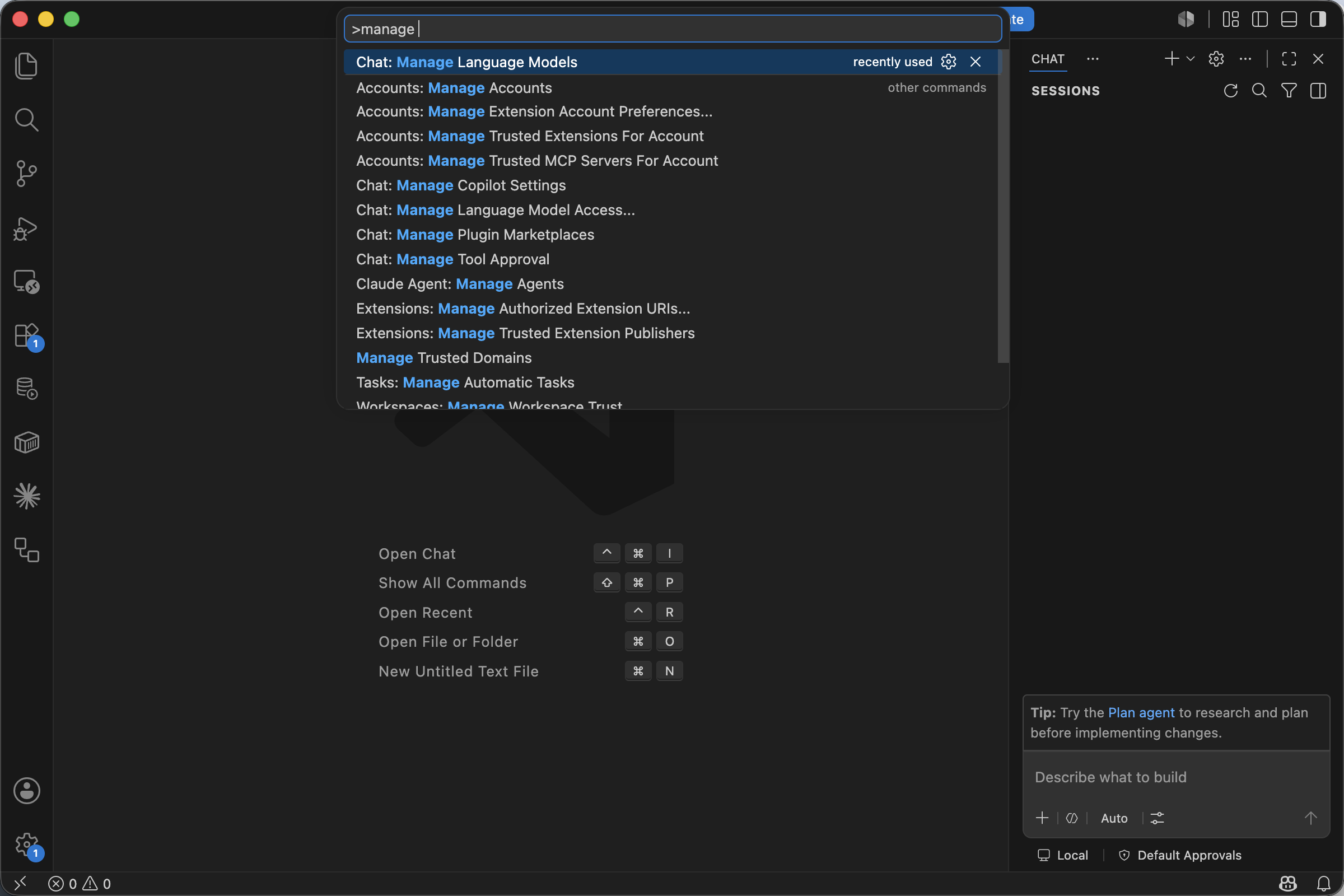
按 ⌘ + Shift + P(macOS)/ Ctrl + Shift + P(Windows / Linux)打开命令面板,输入 manage,选择 Chat: Manage Language Models。
也可以从 Chat 视图右上角点齿轮图标进入同一个面板。
添加 Custom Endpoint
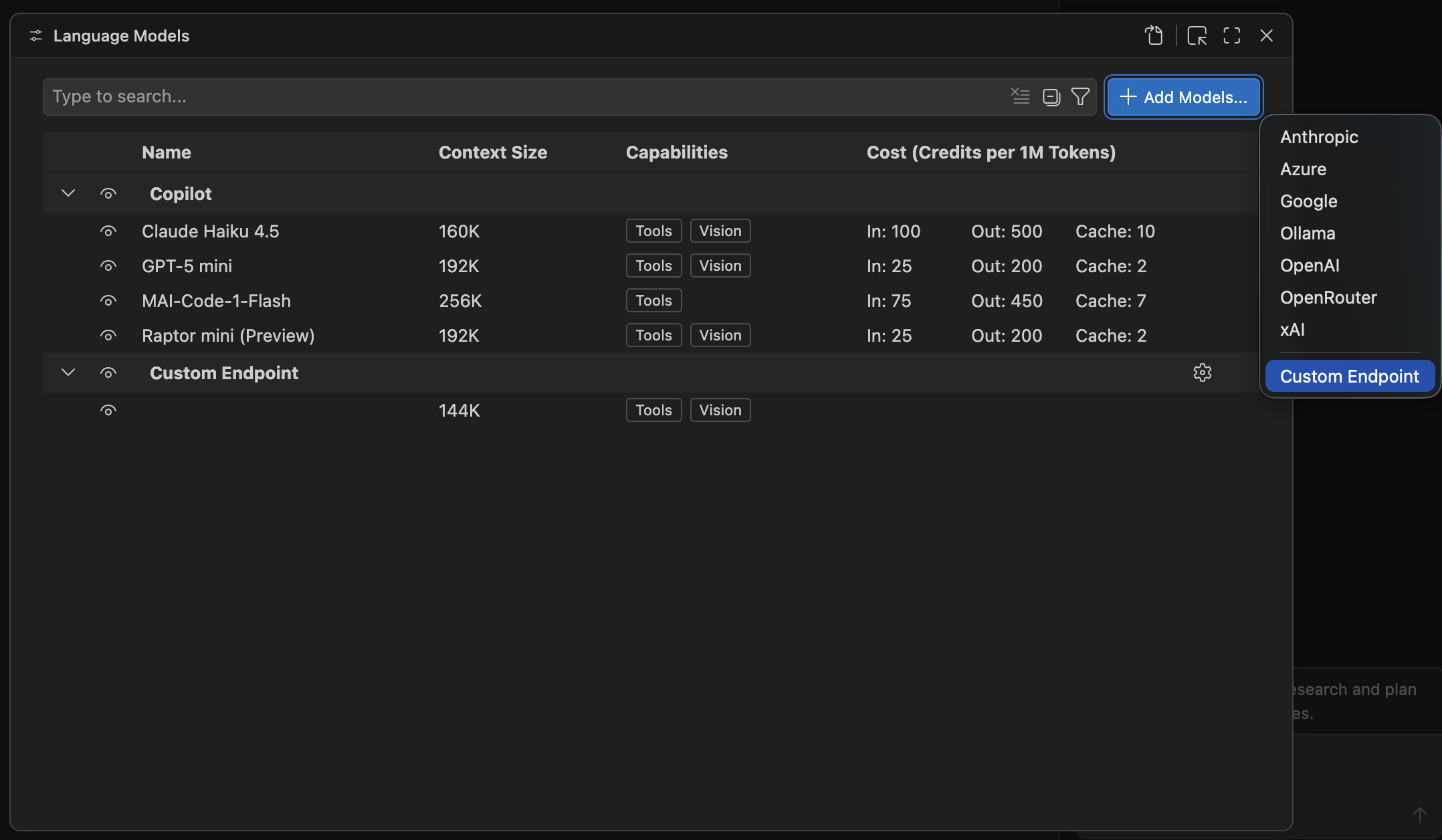
在打开的 Language Models 面板里,点右上角的 Add Models... 按钮,从下拉列表中选择 Custom Endpoint。
下拉里同时也会列出 Anthropic / Azure / Google / Ollama / OpenAI / OpenRouter / xAI 等内置 provider,CherryIN 走 Custom Endpoint。
填入 API Key
紧接着 VS Code 会弹出 Custom Endpoint: API Key 输入框,提示 Enter value for apiKey。
把你的 CherryIN API Key 粘进去,回车确认。

选择 API Type
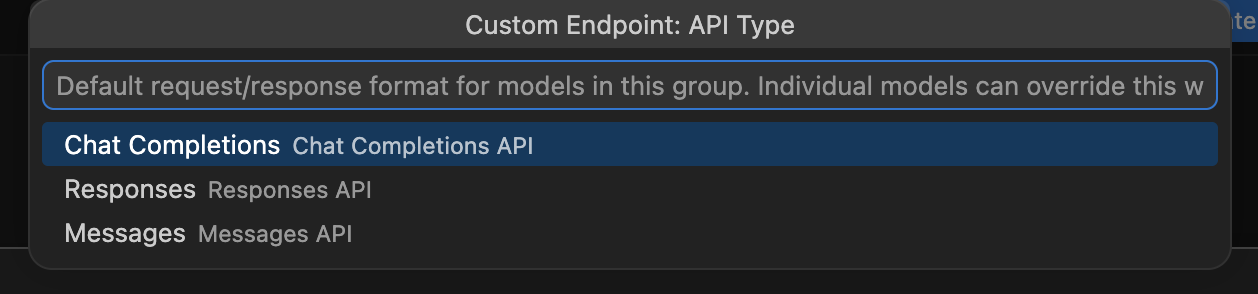
接着会弹出 Custom Endpoint: API Type 选择框,三个选项:
| 选项 | 说明 |
|---|---|
Chat Completions | OpenAI 风格的 Chat Completions API |
Responses | OpenAI 新版 Responses API |
Messages | Anthropic 风格的 Messages API |
CherryIN 选 Chat Completions。
为什么不是 Messages
即使你接的是 Claude 模型,这里也选 Chat Completions,因为 CherryIN 暴露的是 OpenAI 兼容接口(/v1/chat/completions),不是原生 Anthropic Messages 协议。
在 chatLanguageModels.json 里填模型信息
确认 Key 之后,VS Code 会自动打开 chatLanguageModels.json(位于用户配置目录,例如 macOS 的 ~/Library/Application Support/Code/User/chatLanguageModels.json),里面已经预填好了一条骨架:
[
  {
    "name": "Custom Endpoint",
    "vendor": "customendpoint",
    "apiKey": "${input:chat.lm.secret.xxxxxxxx}",
    "apiType": "chat-completions",
    "models": [
      {
        "id": "",
        "name": "",
        "url": "",
        "toolCalling": true,
        "vision": true,
        "maxInputTokens": 128000,
        "maxOutputTokens": 16000
      }
    ]
  }
]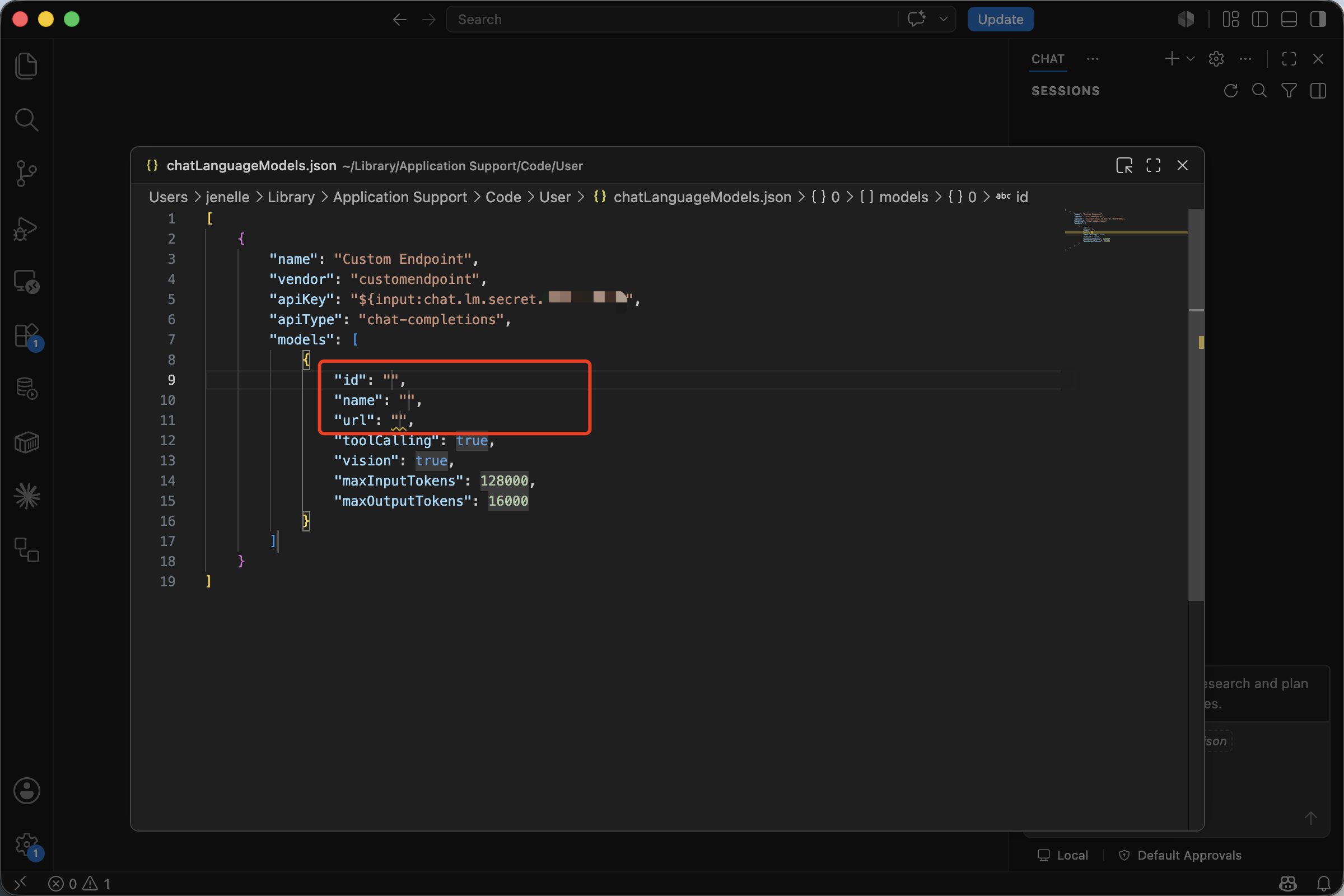
你只需要填三个空字段:id / name / url(截图里红框圈出的部分)。其它字段(vendor / apiKey / apiType / 默认 token 上限)保持 VS Code 生成的即可。
按 CherryIN 填好后的样子:
[
  {
    "name": "Custom Endpoint",
    "vendor": "customendpoint",
    "apiKey": "${input:chat.lm.secret.xxxxxxxx}",
    "apiType": "chat-completions",
    "models": [
      {
        "id": "anthropic/claude-sonnet-4.5",
        "name": "CherryIN · Claude Sonnet 4.5",
        "url": "https://open.cherryin.net/v1/chat/completions",
        "toolCalling": true,
        "vision": true,
        "maxInputTokens": 200000,
        "maxOutputTokens": 8192
      }
    ]
  }
]
字段说明:
| 字段 | 填写说明 |
|---|---|
id | CherryIN 上的完整模型 ID,例如 anthropic/claude-sonnet-4.5 |
name | 显示在模型选择器里的名字,自由命名 |
url | 完整的 endpoint 路径:https://open.cherryin.net/v1/chat/completions |
toolCalling / vision | 模型是否支持工具调用 / 视觉,按实际模型勾选 |
maxInputTokens / maxOutputTokens | 按模型实际能力填,VS Code 默认值是 128000 / 16000 |
apiKey 是引用,不是明文
apiKey 字段里看到的 ${input:chat.lm.secret.xxxxxxxx} 是 VS Code 对 Secret Storage(钥匙串)的引用 —— 真实 Key 已经在上一步存进了系统钥匙串。不要把明文 Key 替换进去,否则会泄漏。
保存这个 JSON 后,新模型会出现在 Language Models 面板的 Custom Endpoint 分组下。
在 Chat 里切换并测试
打开 Chat 视图,点底部的模型选择器,把当前模型切到刚刚添加的 CherryIN · Claude Sonnet 4.5,发送一条简单消息:
请先阅读当前项目结构,并告诉我这个仓库是做什么的。如果能正常返回结果,说明配置已经生效。
添加多个模型
models 是数组,可以在一份 chatLanguageModels.json 里同时挂多条 CherryIN 模型:
[
  {
    "name": "Custom Endpoint",
    "vendor": "customendpoint",
    "apiKey": "${input:chat.lm.secret.xxxxxxxx}",
    "apiType": "chat-completions",
    "models": [
      {
        "id": "anthropic/claude-sonnet-4.5",
        "name": "CherryIN · Claude Sonnet 4.5",
        "url": "https://open.cherryin.net/v1/chat/completions",
        "toolCalling": true,
        "vision": true,
        "maxInputTokens": 200000,
        "maxOutputTokens": 8192
      },
      {
        "id": "anthropic/claude-opus-4",
        "name": "CherryIN · Claude Opus 4",
        "url": "https://open.cherryin.net/v1/chat/completions",
        "toolCalling": true,
        "vision": true,
        "maxInputTokens": 200000,
        "maxOutputTokens": 8192
      },
      {
        "id": "google/gemini-2.5-flash",
        "name": "CherryIN · Gemini 2.5 Flash",
        "url": "https://open.cherryin.net/v1/chat/completions",
        "toolCalling": true,
        "vision": true,
        "maxInputTokens": 1000000,
        "maxOutputTokens": 8192
      }
    ]
  }
]
推荐模型
| 模型 ID | 适合场景 |
|---|---|
anthropic/claude-sonnet-4.5 | 日常编码、重构、代码解释 |
anthropic/claude-opus-4 | 复杂分析、长上下文任务 |
google/gemini-2.5-flash | 成本敏感、响应速度优先 |
常见问题
Add Models... 里找不到 Custom Endpoint
请确认:
- VS Code 已升级到 stable 最新版(早期 Insiders 版本入口名称不同)
- GitHub Copilot Chat 扩展已安装并启用
- 通过命令面板的
Chat: Manage Language Models进入面板
提示 404 或请求失败
Custom Endpoint 这里要的是完整 endpoint,不是 Base URL,注意带上 /chat/completions:
https://open.cherryin.net/v1/chat/completions漏掉 /v1 或 /chat/completions 都会 404。
模型选择器里看不到我加的模型
- 保存
chatLanguageModels.json后,回到Language Models面板看Custom Endpoint分组里是不是已经出现 - 在 Chat 视图底部点模型名 → 勾选刚才那条
- 如果还是没出现,关闭并重新打开 Chat 视图
API Key 填了还是认证失败
请检查:
- Key 是否来自 CherryIN 控制台
- Key 前后是否有空格
- 账户是否已充值并处于可用状态
- 如果之前填错过,可在命令面板运行
Chat: Manage Language Models,对Custom Endpoint重新输入 Key
BYOK 不影响补全(completion)
VS Code 官方明确说明:BYOK 只作用于 Chat / Agent,代码补全仍走 Copilot 内置模型,无法用 CherryIN 替换。
下一步
- 想先理解通用规则:看 OpenAI 兼容接入指南
- 想看原始代码示例:看 代码调用教程
- 想在同一编辑器里用 Cline:看 Cline 配置教程